Read the schedule from both ends
Compare the calendar in the app with the plan stored on the mower or base station, if both are visible. Confirm AM versus PM, local time, daylight-saving behavior, and the selected weekdays. A phone can display a new plan that has not reached an offline mower. Look for a sync timestamp or confirmation rather than assuming the save button completed transmission.
Find the higher-priority pause
Rain sensors, forecasts, frost protection, battery temperature, quiet hours, wildlife modes, manual park-until-further-notice, vacation settings, and child controls may override ordinary mowing. The event log often names the reason. Decide whether the protection is appropriate before disabling it; moving a run to daylight may be safer than turning off wildlife-aware scheduling.
Check zone and map assignments
A valid time window may point to an inactive, deleted, inaccessible, or zero-duration work area. Review each zone’s days and permitted transitions. After remapping, docking, or a software update, verify that the schedule still references the intended lawn. Wire systems with secondary areas may require manual placement and therefore cannot launch every zone autonomously.
Create one clean test
Choose a supervised daylight period, give it a clear start and finish, ensure the battery is charged, and remove overlapping rules. Do not create multiple test events because their interactions obscure the result. If it leaves on time, rebuild the regular plan gradually. If it stays docked, capture the status at the scheduled minute and try a normal manual start.
Distinguish scheduling from machine failure
A failed manual start, missing loop, no map position, charge fault, station outage, or active safety code is not fundamentally a calendar problem. Resolve that condition first. If manual operation is reliable but schedules repeatedly disappear or shift, update through the supported path, preserve screenshots, and ask the manufacturer to inspect account, region, or cloud synchronization.
For a product-led next step, compare Robotic Lawn Mowers for Hills or use the yard-fit finder.
Products to evaluate against this advice
As an Amazon Associate, we may earn from qualifying purchases.
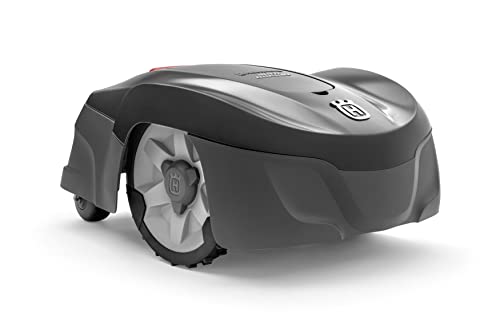
Husqvarna Automower 115H 4G Robotic Lawn Mower for 0.4 Acre
The Automower 115H 4G is a useful benchmark for owners who value an established boundary-wire system over antenna placement or camera mapping. Its high-cut orientation can suit common residential turf, but the cable installation and current listing availability should be weighed before purchase.

LawnMaster OcuMow VBRM601YCM MAX Wire-Free Robot Lawn Mower
The OcuMow MAX extends LawnMaster’s optical concept into a higher square-foot band. It is a stronger candidate than the smaller portable model when the lawn is still simple but takes too long for repeated short sessions; complex islands and indistinct edges remain the important caveats.

ANTHBOT M9 Wire-Free Robotic Lawn Mower with Garage for 1/4 Acre
The M9 listing is notable because shelter is part of the bundle rather than a separate compatibility purchase. That can simplify installation planning, though buyers should still distinguish the garage from the charging base and verify how the mower maps shaded or tree-lined sections.
Frequently asked questions
Why did the mower skip one day without an error?
Weather automation, growth-based scheduling, a completed coverage estimate, or an overlapping quiet period may have canceled that run intentionally.
Does the mower need Wi-Fi to follow a saved schedule?
Many can execute a locally stored plan offline, but cloud-created changes, weather features, and app status may require connectivity. Confirm the exact model.
Can two family members change the schedule?
Shared accounts and roles differ. Conflicting edits from multiple phones can explain unexpected changes, so review access and the last synchronization.
Bottom line
Use the answer above as a decision framework, then verify the exact product manual, current listing and conditions in your own lawn. Model generations, software features and included accessories can change.