Separate no power from no battery acceptance
Look at the charging station and power-supply indicators before moving the mower. A dark station points toward the outlet, protection device, cable, or supply; a normal station with no battery progress points toward alignment, contacts, temperature, software, or battery condition. Photograph indicator patterns because color and flashing sequences mean different things on different brands.
Inspect the final approach
Clippings, a sunken base, warped paving, wheel ruts, or a shifted guide wire can leave the contacts touching poorly. The station should be level and secured as specified, with a clear straight entry where required. Do not bend charging plates to force contact. Correct the base or approach and supervise one docking cycle to see whether the mower seats fully.
Clean only accessible contact surfaces
Switch off power using the documented procedure. Wipe dry dirt with a soft cloth and follow the manual for oxidation; abrasives can remove protective plating, and conductive tools can create a short. Make sure spring contacts move only as intended. Water, grease, household polish, and improvised electrical sprays should stay away unless expressly approved.
Account for temperature and deep discharge
Battery management may pause charging after a hot mowing session or when equipment has been stored in freezing conditions. Let the mower reach its allowed range naturally—never warm it with a heater. A pack left empty through storage can fall below recovery limits. Repeatedly reconnecting it is not a safe substitute for the manufacturer’s recovery process.
Use one controlled electrical check
Test the outlet only with a safe known-good device or approved tester, and reset a tripped protective device once after checking for damage. Verify that the power supply is the correct model and every user connector is fully seated. If protection trips again, indicators remain abnormal, runtime has recently collapsed, or charging generates excess heat, stop and contact qualified support.
For a product-led next step, compare Robotic Lawn Mower Garages & Covers or use the yard-fit finder.
Products to evaluate against this advice
As an Amazon Associate, we may earn from qualifying purchases.

ANTHBOT M9 Wire-Free Robotic Lawn Mower with Garage for 1/4 Acre
The M9 listing is notable because shelter is part of the bundle rather than a separate compatibility purchase. That can simplify installation planning, though buyers should still distinguish the garage from the charging base and verify how the mower maps shaded or tree-lined sections.
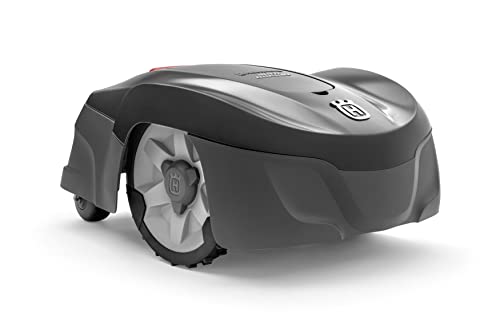
Husqvarna Automower 115H 4G Robotic Lawn Mower for 0.4 Acre
The Automower 115H 4G is a useful benchmark for owners who value an established boundary-wire system over antenna placement or camera mapping. Its high-cut orientation can suit common residential turf, but the cable installation and current listing availability should be weighed before purchase.

LawnMaster OcuMow Wire-Free Robot Lawn Mower for 1,000–2,000 Sq Ft
This compact OcuMow is built around a focused drop-and-mow job rather than a permanent autonomous installation. It can make sense for a small enclosed lawn with obvious grass borders, but it should not be mistaken for the auto-charging OcuMow variants sold under other ASINs.
Frequently asked questions
Why does the app say charging but the percentage does not rise?
The status may show dock contact before meaningful current flows. Temperature, an aging battery, contact resistance, or a fault code can prevent progress.
Can I use a different charger with the same plug?
No. Voltage, current, polarity, communication, and safety approvals may differ even when a connector fits.
Should charging contacts be sanded?
Only if the manufacturer specifies that method. Aggressive abrasion can remove plating and make corrosion return faster.
Bottom line
Use the answer above as a decision framework, then verify the exact product manual, current listing and conditions in your own lawn. Model generations, software features and included accessories can change.