Decide whether replacement is actually due
Ragged, pale grass tips, longer mowing times, increased noise, visible nicks, or blades that no longer pivot cleanly can justify inspection. Calendar intervals are only a starting point because sandy soil, sticks, acreage, and operating frequency change wear. Never judge sharpness by drawing a finger across an edge. Compare the condition with the manufacturer’s replacement guidance and record the service date.
Buy a verified matching set
Match the mower model, product generation, blade geometry, screw length, thread, and any washer or locking feature. Similar-looking marketplace blades can differ in mass or clearance, which may unbalance a fast-spinning disc. Use an approved set from a traceable seller. If the package includes replacement screws, treat them as part of the kit rather than automatically reusing stretched, corroded, or thread-locked hardware.
Create a controlled work position
Park on a dry, stable surface, end the mowing session, engage the main power switch, and follow the manual’s shutdown sequence. Remove loose grass before opening anything. Support the mower so it cannot rock or fall; do not rest weight on a fragile cover, antenna, camera, or lift sensor. Photograph the original blade orientation before removal, especially when the cutting edges are directional.
Change the full set methodically
Hold the carrier only at the safe location shown in the instructions and use the correct driver bit so the screw head is not stripped. Replace all blades on the disc together to preserve balance. Clean the seating surfaces without forcing debris into bearings, install each piece in the documented orientation, and tighten to the specified torque when one is provided. Free-swinging blades must move independently after tightening.
Verify before returning to automatic service
Inspect the guard and disc for cracks, rotate the assembly slowly through a full revolution, and make sure every blade clears the chassis. Restore the mower upright and perform the prescribed startup away from hands, feet, children, and pets. Watch the first short session for vibration, scraping, or an abnormal sound. Shut down immediately if the new set does not run smoothly.
For a product-led next step, compare Robotic Lawn Mowers for Hills or use the yard-fit finder.
Products to evaluate against this advice
As an Amazon Associate, we may earn from qualifying purchases.
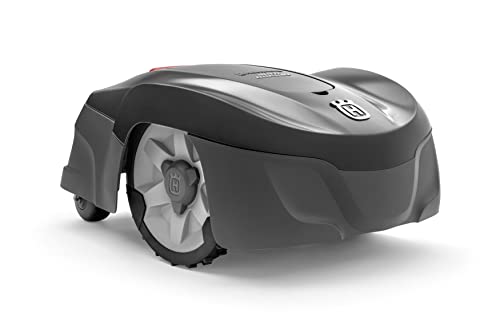
Husqvarna Automower 115H 4G Robotic Lawn Mower for 0.4 Acre
The Automower 115H 4G is a useful benchmark for owners who value an established boundary-wire system over antenna placement or camera mapping. Its high-cut orientation can suit common residential turf, but the cable installation and current listing availability should be weighed before purchase.

LawnMaster OcuMow VBRM601YCM MAX Wire-Free Robot Lawn Mower
The OcuMow MAX extends LawnMaster’s optical concept into a higher square-foot band. It is a stronger candidate than the smaller portable model when the lawn is still simple but takes too long for repeated short sessions; complex islands and indistinct edges remain the important caveats.

ANTHBOT M9 Wire-Free Robotic Lawn Mower with Garage for 1/4 Acre
The M9 listing is notable because shelter is part of the bundle rather than a separate compatibility purchase. That can simplify installation planning, though buyers should still distinguish the garage from the charging base and verify how the mower maps shaded or tree-lined sections.
Frequently asked questions
Can I sharpen robotic mower blades instead?
Only if the manufacturer explicitly permits it for that blade design. Small pivoting blades are commonly treated as replaceable wear parts, and uneven sharpening can disturb balance.
Do I need to replace every blade at once?
Yes, replacing a matched set is the safer default. Mixing worn and new pieces can create uneven cutting and imbalance.
Why use new blade screws?
Fasteners may include locking material or experience wear and corrosion. Use new screws when the approved kit or service instructions call for them.
Bottom line
Use the answer above as a decision framework, then verify the exact product manual, current listing and conditions in your own lawn. Model generations, software features and included accessories can change.